

Valheim Hosting
EU hosted. Full panel access.
Your Viking world,always online.
A Valheim dedicated server keeps your world running around the clock, so your party can log in whenever they like without one person acting as host. Automatic backups, full access to your world files, and the settings that matter changeable straight from the panel.
What the panel gives you
A world manager, not a file list
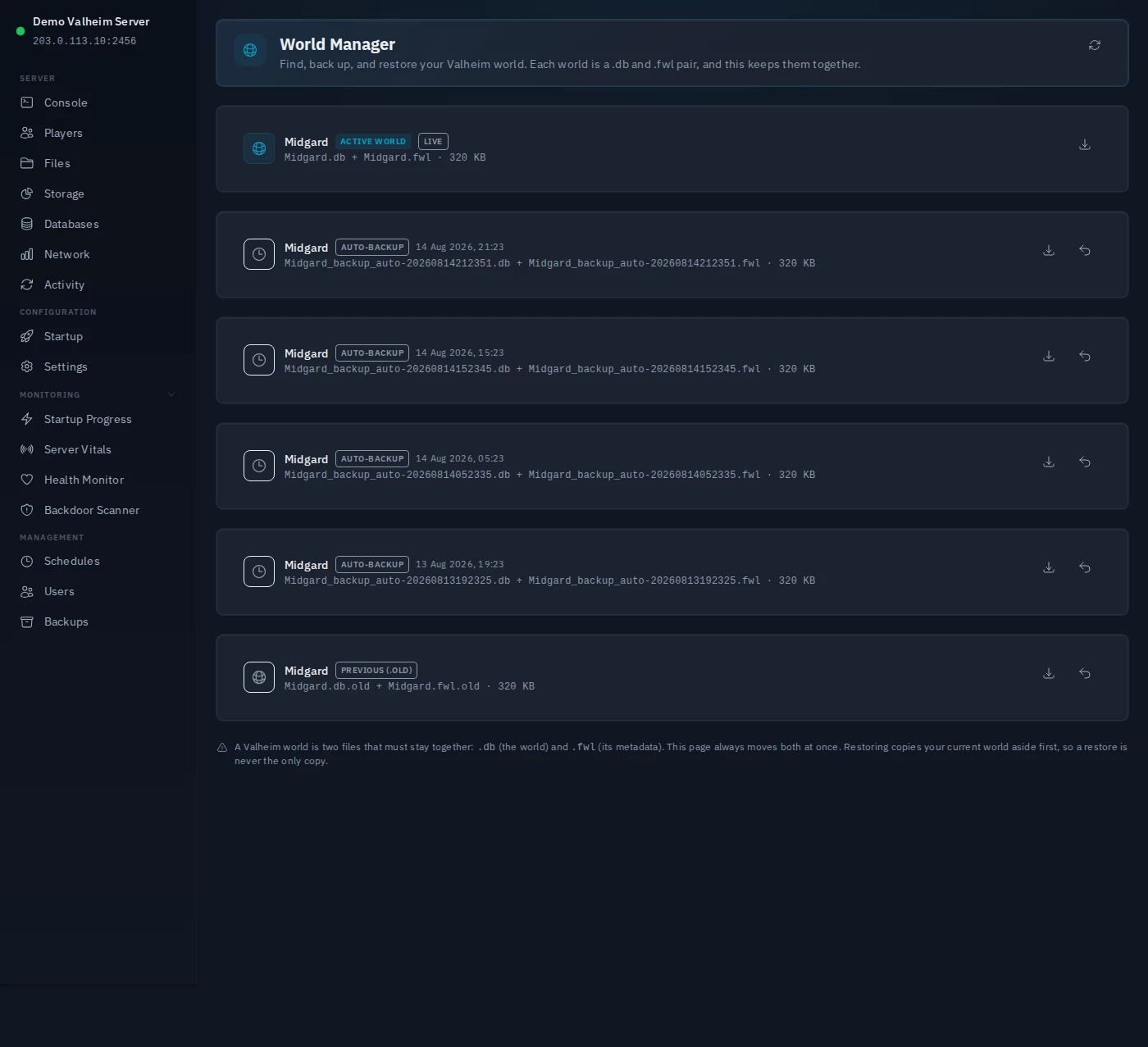
Valheim doesn't store a world as a single file. Next to the live pair it leaves older rollbacks and its own timed backups, and in a plain file list they all look alike. The World Manager shows you which two files are your live world, restores an earlier one without overwriting your current copy, and downloads the pair so you always have a copy. A restore stops the server and asks first, so you never end up half-swapped.
Automatic backups, with restore
Backed up on a schedule you set, restored from the panel in a couple of clicks. You can pull a single file out of a backup instead of rolling the whole world back.
Server settings without touching files
Server name, world name and password are fields in the panel, not lines in a config file you have to find first. Plus a launch-arguments box for flags we do not surface.
Listed in the server browser
Your server appears in Valheim's in-game browser under its own name, so friends can find it by name rather than by address. If you would rather stay unlisted, set Public to 0 on the Startup page.
Bring the world you already play on
Moving from a locally-hosted world? Upload your existing world files and the server carries on from where you were, rather than generating a new one.
Real access to your world files
A Valheim world is a pair of files on disk and you can reach both - browser file manager, or SFTP with your own client. Take a copy before a risky update.
Live console
Watch the server's output as it happens, from first boot through world generation to players connecting. When something breaks, the log is already in front of you.
Scheduled restarts
Restart on a schedule - overnight is the usual choice - so the server picks up game updates without anyone being awake for it. Schedules can fire a backup first.
Give your party access, not your password
Add people with granular permissions, so a friend can restart the server or pull a backup without holding the keys to your account. Everything they do is logged.
A real code editor in the browser
Every plan includes Workspace, a full Visual Studio Code in your browser, wired into the server's files. Overkill for a rename; useful the moment you edit by hand.

What you control
The settings that matter, in the panel.
What your party sees when they connect. Change it any time from the Startup page - no file editing, no reinstall, no ticket.
Which world the server loads when it starts. Valheim keys its save files to this name, so this is the setting that decides whether you carry on an existing world or generate a fresh one.
Required by Valheim itself - five characters minimum, and it cannot match the world name. Rotate it from the panel whenever you need to change who can get in.
A free-text field passed straight through to the server binary, for flags we do not give a dedicated box. Optional - empty is a perfectly normal setup.
The actual panel
Find your world. Restore it. Keep it safe.
Verified, not claimed
We tested this on a real server.
Two of the features above were proven on a real Valheim server rather than inferred from how the panel works. They are worth showing because each had a specific way it could have failed, and did not.
Byte-identical
World restored, not regenerated
We deleted every file of a test world, re-uploaded the pair through the panel, and booted it. It loaded the uploaded world rather than silently generating a fresh one - the failure that would have made this claim false - and both files came back byte-identical.
1,007
Entries listed inside one backup
We opened a real backup archive and listed what was actually in it rather than trusting a success flag, and found the world pair present at the right path alongside the full server install.
Good to know
Before you set one up.
These are facts about Valheim itself rather than things we do - worth knowing whoever you end up hosting with.
RAM scales with your party
A 4-10 player server typically needs 4-8 GB. Larger parties and bigger explored worlds push that up.
Worlds grow as you explore
World files only hold terrain you have actually explored, so storage climbs steadily over a long-running world rather than being fixed up front.
The server runs on its own
Your world stays online whether or not the person who set it up is playing. Nobody has to leave a PC running.
Everyone needs the same version
Clients and servers must match on version, so after a game update the server needs updating too before your party can get back in.
The world is the save
A world is a pair of files - the map and its metadata. Keeping copies of those two is what makes it recoverable, which is why backups matter more here than in games that keep your progress in a central database.
A password is not optional
At least five characters, and it cannot match the world name. That is Valheim enforcing it, not us.
Want the full setup walkthrough first? Read how to host a Valheim server.
Pricing
All features at every tier.
Every panel feature is included regardless of which plan you are on. We charge for server resources, not for access to tools.
Standard
£9/mo
4 GB RAM · 60 GB storage
Pro
£17/mo
8 GB RAM · 120 GB storage
Both plans are available now. No card required to start, cancel any time.